Enthusiast add-ons
Extra dollars you add to the offer for vehicles a collector or rebuilder pays more for.
Some cars are worth more than their metal: a Mustang GT, a Jeep Wrangler, a truck people rebuild, or simply anything new enough to part out. An enthusiast add-on adds dollars to the offer for every vehicle, one make or one model over a run of years, on every trim or only the trims you pick.
Enthusiast add-ons
Dollars you add to the offer for particular vehicles. A car gets at most one add-on, never two added together, before the bid multiple. You choose which one wins when two cover the same car.
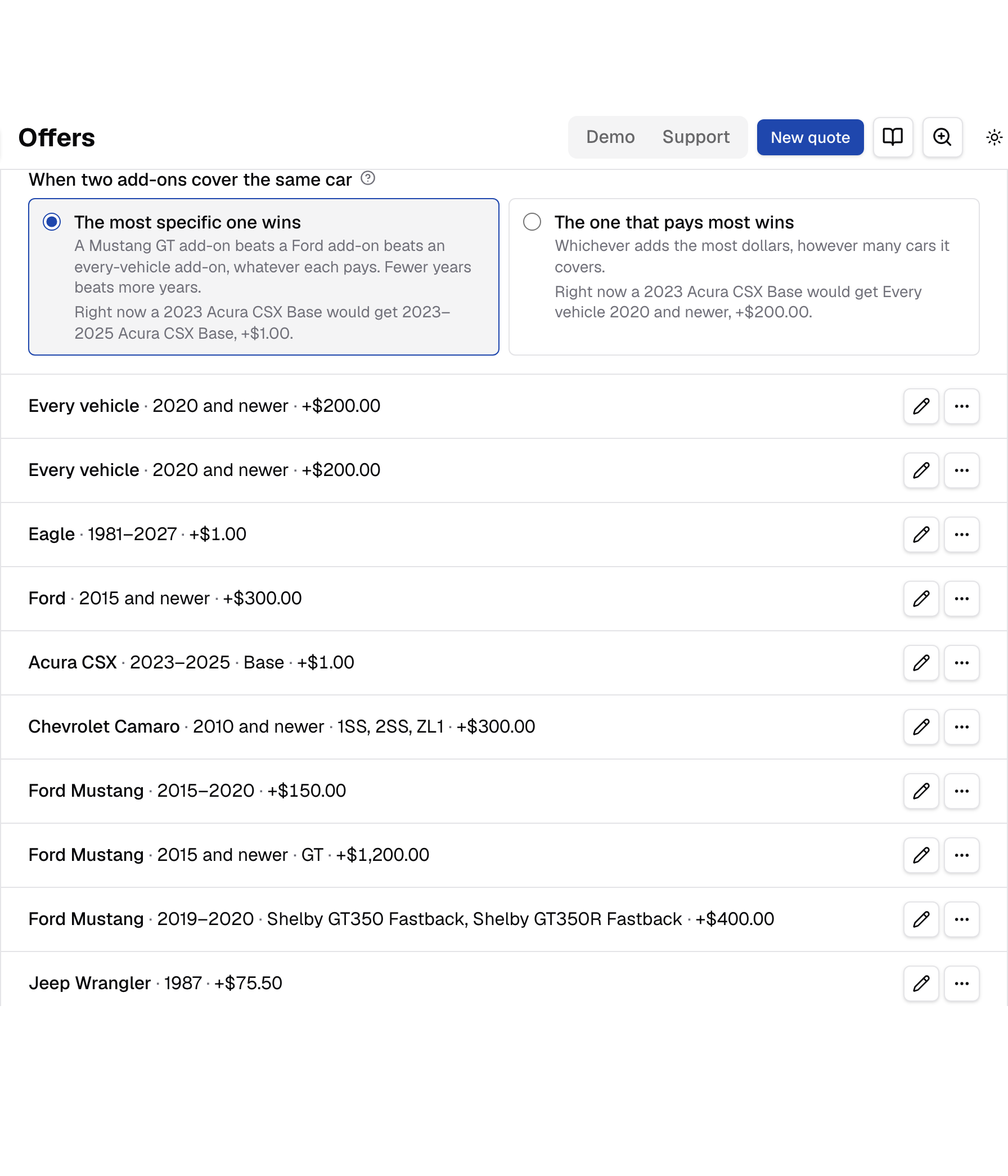
The card on Offers says in one line how add-ons work, lets you pick which one wins, and lists every add-on as a sentence, broadest first, then by make, model and years:
- Every vehicle · 2020 and newer · +$200.00
- Ford · 2015 and newer · +$300.00
- Ford Mustang · 2015–2020 · GT, GT350 · +$1,200.00
Each row has an edit button and, in its menu, Remove. Add an add-on opens the form. With no add-ons yet, the card reads "No enthusiast add-ons yet" with Add an add-on beside it.
Staff see the list but no Add an add-on, edit or Remove.
When two add-ons cover the same car
Which add-on a car gets when more than one covers it. The most specific one wins, or the one that pays most wins. A car never gets two added together.
Two choices, with Save under the list:
- The most specific one wins. An add-on naming the car's trim beats an every-trim one, then one model beats one make beats every vehicle, then the one with fewer years, then the larger amount. A cheap narrow add-on beats an expensive broad one.
- The one that pays most wins. Whichever adds the most dollars, however many cars it covers. Between two that pay the same, the most specific.
Under each choice, when two of your add-ons cover the same car, a line says what that car would get right now, such as "Right now a 2021 Ford Mustang GT would get 2015 and newer Ford Mustang GT, +$1,200.00." When no two overlap, the card says so instead. Changing the choice changes new offers only.
How a car gets an add-on
- One add-on per car, never more. When several cover a car, the one you chose above wins. A broad add-on never adds to a specific one, and the diesel truck add and the seller's answers always apply on top.
- A trim-only add-on needs a known trim. The trim is known when the seller picks one, or a VIN gives exactly one. A seller who picks "Not sure", or whose VIN could be one of several trims, gets only every-trim add-ons.
- When a trim-only add-on would have paid more, the quote shows If they know the trim with what the offer would be under it. For a VIN that could be several trims, it lists only add-ons for trims that VIN could be. If the seller calls the offer too low, ask which trim they have; see If they know the trim.
- The add-on joins the scrap value before the bid multiple, so at 80% a $500 add-on raises the offer by $400. In the quote's breakdown it's the first line after the metals and the diesel truck add, named for the add-on, such as "Enthusiast add-on, 2015–2020 Ford Mustang GT" or "Enthusiast add-on, Every vehicle 2020 and newer".
- Make and model match however they're written: "F150" is "F-150".
For example, with $200 on every vehicle 2020 and newer, $300 on every Ford 2015 and newer, and $1,200 on the 2015 and newer Mustang GT, a 2021 Mustang GT gets $1,200, a 2021 Ford Escape gets $300, and a 2021 Honda Civic gets $200, under either choice. None of them add up. Make the Mustang GT add-on $100 instead, and the 2021 GT gets $100 when the most specific wins, $300 when the one that pays most wins.
A seller never sees the add-on, only the offer.
Editing and removing
- Edit opens the add-on on the same form, under the title Edit enthusiast add-on. Save goes back to Offers and says "Saved."; Cancel goes back without saving.
- Remove asks first: "Remove this add-on?", naming it, with "New offers stop adding it. Offers already made keep it." Press Remove to confirm. Offers then says "Removed the add-on for" and the add-on.
Editing or removing an add-on never changes an offer already made: each offer keeps the add-on it was made with.
If someone removed the add-on while you had it open, your save is refused: "This add-on was archived while you had it open, so nothing was saved. Add it again to make a new one." Removing one that's already gone says "That add-on was already removed."
Add an enthusiast add-on
One form: which vehicles, which years, which trims, and the dollars. Under it, what the add-on covers in our vehicle list and which other add-ons it overlaps, kept up to date as you change the fields.
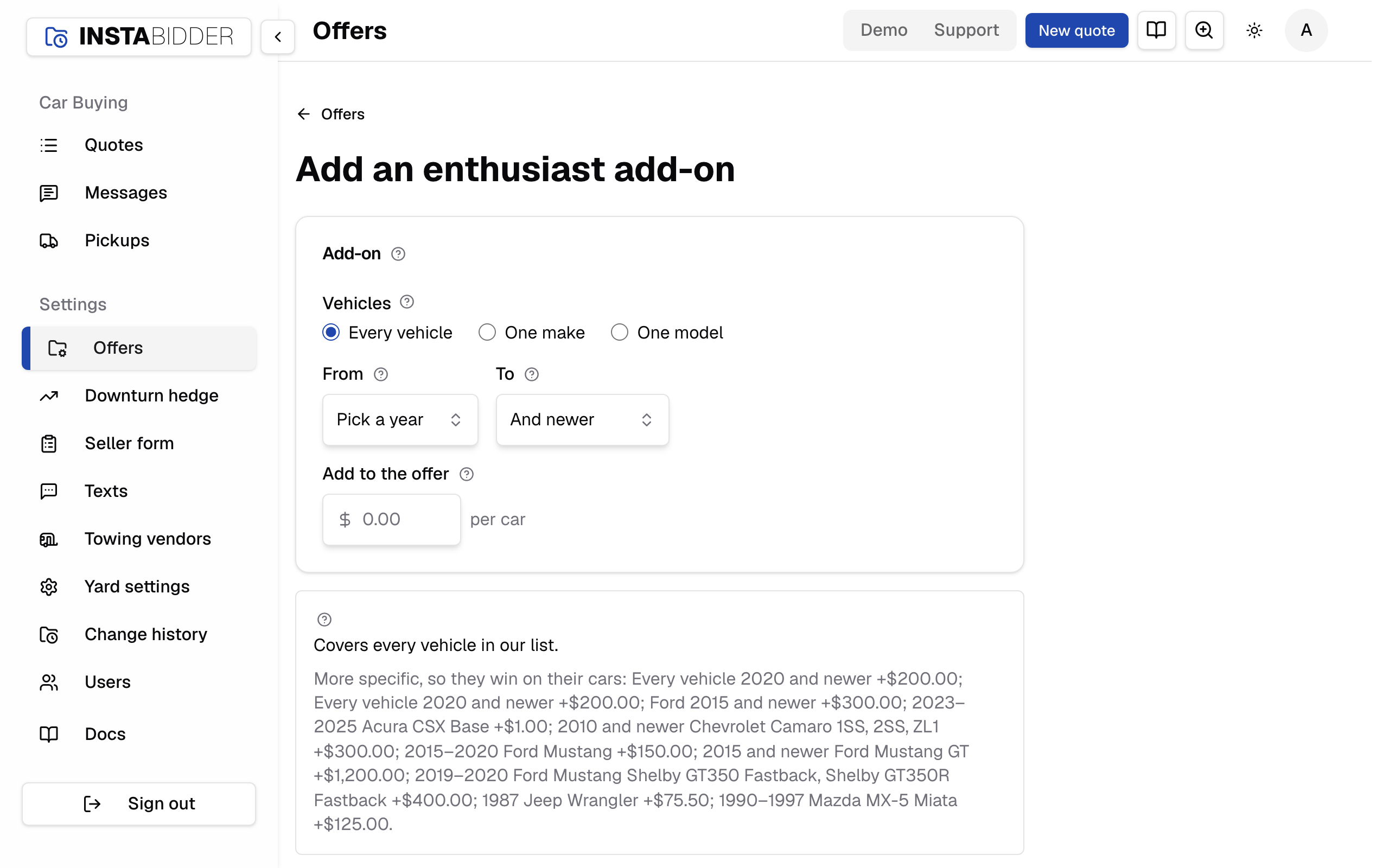
Add an add-on on Offers opens this page. Offers at the top, or Cancel, goes back without adding anything. Fill in Vehicles, then Make and Model if the add-on is for one, From and To, Trims for one model, and Add to the offer, then Save. Offers then says what was added, such as "Added the add-on for Every vehicle 2020 and newer."
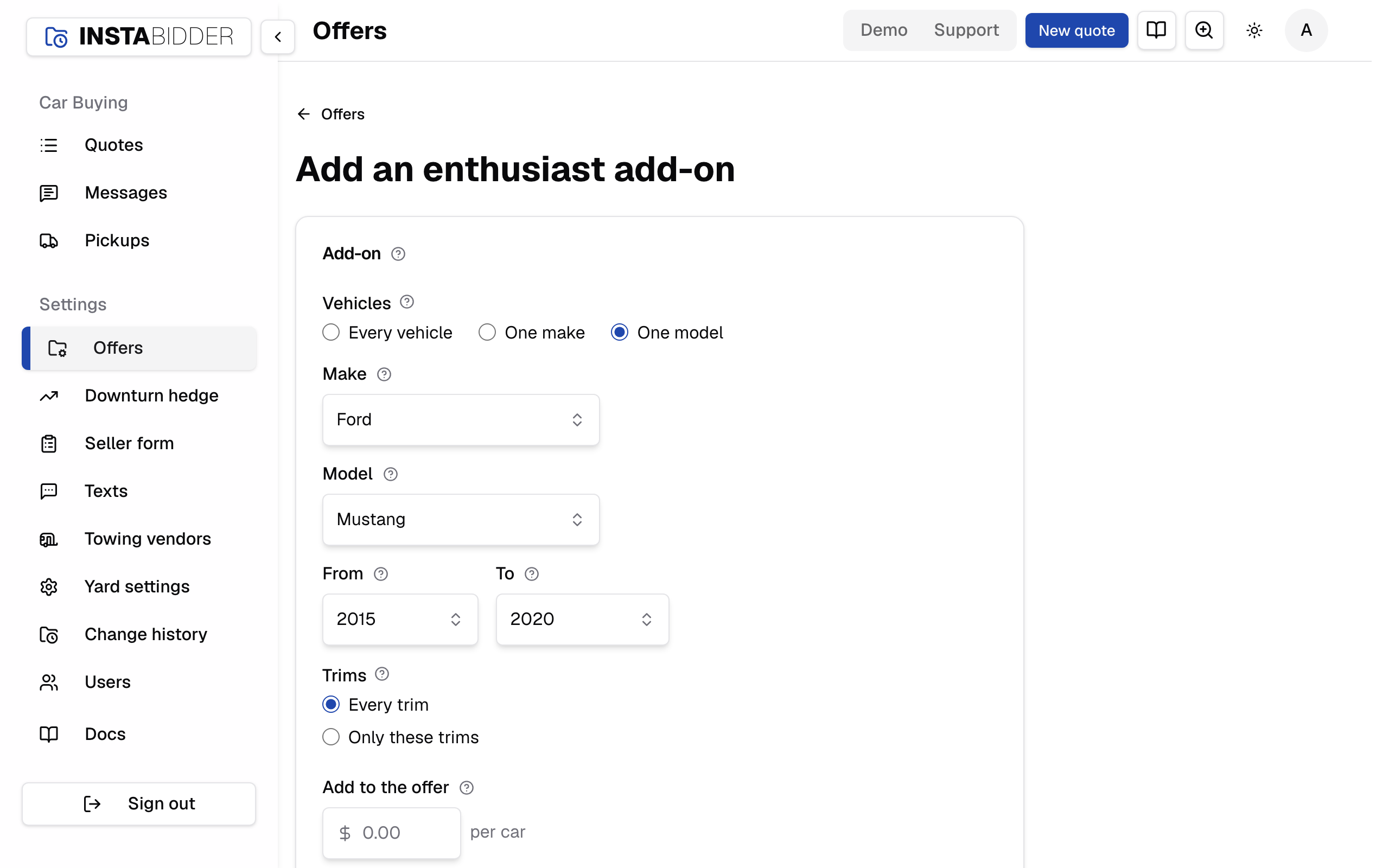
If something is missing, nothing is saved and the field says what to fix:
- "Pick a make."
- "Pick a model."
- "Pick the first year."
- "End on or after the first year."
- "Pick a trim, or choose Every trim."
- "Enter dollars from $0.01 to $100,000."
- "Enter dollars and cents."
Adding an add-on that overlaps another doesn't replace it. Both stay on the list, and each car gets the most specific of them.
Vehicles
Every vehicle covers any car in its years, whatever the make. One make covers every model of the make you pick. One model covers the make and model you pick, on every trim or only some.
Pick One make or One model and the Make field appears; pick One model and Model and Trims appear too.
Make
The make the add-on is for, from every make in our vehicle list. Picking one fills the Model list.
Model
The model the add-on is for, from every model of that make in our vehicle list. Picking one lists its trims.
The list reads "Pick a make first" until a make is chosen.
From
The first model year the add-on covers. It can't be after To.
To
The last model year the add-on covers. And newer also covers model years added to our vehicle list later.
Trims
Every trim covers the model whatever its trim, including when the trim isn't known. Only these trims covers the trims you tick, when the trim is known.
Only for one model. Under Only these trims, every trim the model has had is listed with the years it was offered. A trim an add-on names that our vehicle list no longer has shows "not in the vehicle list". Pick at least one trim, or choose Every trim.
Add to the offer
Dollars this add-on adds to the car's scrap value, from $0.01 to $100,000, before the bid multiple.
What it covers
Under the form, how many vehicles in our list the add-on as written covers, and which other add-ons cover some of the same cars. It changes as you change the fields.
A vehicle is one year, make, model and trim in our list. The line reads, for example, "Covers 5,881 vehicles in our list: every 2020 and newer model." or "Covers 19 vehicles in our list: Ford Mustang 2015–2020, every trim." Until a make or model is picked it reads "Pick a make to see what it covers." An add-on that matches nothing in the list reads "Covers nothing in our list yet; it still applies if a seller's car matches." One with no year or scope narrowing it reads "Covers every vehicle in our list."
When other add-ons cover some of the same cars, the box lists which wins under the choice you made on Offers, one add-on a line with its amount, the first five of each and "and 3 more":
- More specific, so they win on the cars both cover (or Pay more, so they win on the cars both cover): the add-ons that beat this one where they overlap.
- This one is more specific, so it wins over (or This one pays more, so it wins over): the add-ons this one beats.
A last line reminds you which choice is in force, with a link to change it. Overlap never stops a save. Each car still gets one add-on.